NetsPresso

One Prompt.
A Deployable Model.

WORKFLOW

The Model Optimization Platform,
Run by Agents

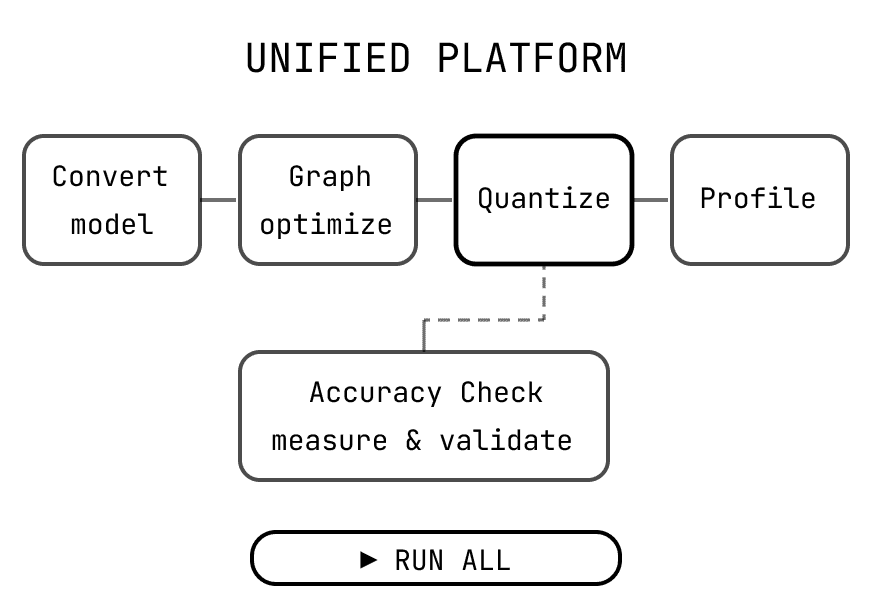
Tell the agent your target model, deployment environment, and goal metrics. It handles the entire optimization pipeline.

01

Advanced Quantization

02

Graph Optimization

03

Graph Quantization

Advanced Quantization (AQ)

AQ delivers SOTA quantization in Torch eager mode, integrating cutting-edge techniques into our stack for peak model efficiency - especially effective for LLMs.

Key Techniques

AWQ — Activation-based weight channel protection

AutoRound — Iterative optimization for higher precision

QuaRot — Rotation-based outlier suppression

RTN — Baseline round-to-nearest method

👉 Maximize compression while preserving accuracy in LLMs

Graph Optimization (GO)

Rewrites the computational graph to improve compatibility and efficiency without changing model parameters.

Key Techniques

Conv + BatchNorm fusion

QKV attention fusion

Remove unnecessary reshape / transpose

Dropout elimination

👉 From incompatible to hardware-ready

Graph Quantization (GQ)

Uses calibration data to determine optimal activation ranges and applies precision schemes across layers.

Key Techniques

W8-A8 — Balanced performance (default)

W4-A8 — Smaller model size

W4-A16 — Compressed weights, higher precision

W8-A16 — Accuracy-focused configuration

👉 Convert models into efficient formats

01

Advanced Quantization

02

Graph Optimization

03

Graph Quantization

Advanced Quantization (AQ)

AQ delivers SOTA quantization in Torch eager mode, integrating cutting-edge techniques into our stack for peak model efficiency - especially effective for LLMs.

Key Techniques

AWQ — Activation-based weight channel protection

AutoRound — Iterative optimization for higher precision

QuaRot — Rotation-based outlier suppression

RTN — Baseline round-to-nearest method

👉 Maximize compression while preserving accuracy in LLMs

Graph Optimization (GO)

Rewrites the computational graph to improve compatibility and efficiency without changing model parameters.

Key Techniques

Conv + BatchNorm fusion

QKV attention fusion

Remove unnecessary reshape / transpose

Dropout elimination

👉 From incompatible to hardware-ready

Graph Quantization (GQ)

Uses calibration data to determine optimal activation ranges and applies precision schemes across layers.

Key Techniques

W8-A8 — Balanced performance (default)

W4-A8 — Smaller model size

W4-A16 — Compressed weights, higher precision

W8-A16 — Accuracy-focused configuration

👉 Convert models into efficient formats

Or skip the agent and drive it yourself with CLI. 

Same pipeline, every knob exposed.

1

$ np run |

CORE CAPABILITIES

Everything You Need to Optimize and Deploy AI

Goal-Driven Optimization

Describe the goal; the agent builds the recipe

Integrated Optimization Workflow

Run full optimization with minimal effort

Deployment-Ready Model Zoo

Optimized models that actually run on target devices

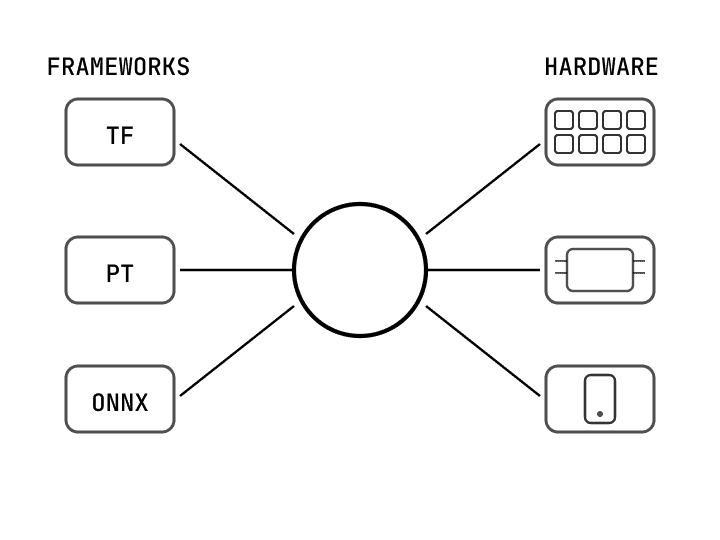
Flexible Deployment

Supports multiple model frameworks and hardwares

  • Goal-Driven Optimization

    Describe the goal; the agent builds the recipe

  • Integrated Optimization Workflow

    Run full optimization with minimal effort

  • Deployment-Ready Model Zoo

    Optimized models that actually run on target devices

  • Flexible Deployment

    Supports multiple model frameworks and hardwares

  • Goal-Driven Optimization

    Describe the goal; the agent builds the recipe

  • Integrated Optimization Workflow

    Run full optimization with minimal effort

  • Deployment-Ready Model Zoo

    Optimized models that actually run on target devices

  • Flexible Deployment

    Supports multiple model frameworks and hardwares

Real Results on Real Hardware

On device benchmarks:
Before vs. After optimization

Arm

NVIDIA

Alif Ensemble® E8

MODEL_ SiNet Segmentation

Graph Optimization via NetsPresso fully migrated the model to the NPU — eliminating CPU fallback and achieving near-complete hardware utilization.

LATENCY

57.9

ms

781.8ms

RESULT

13.5x faster inference

CPU USAGE

0.4

%

46.9%

RESULT

478 → 3 nodes

NPU USAGE

99.6

%

53.1%

RESULT

542 → 784 nodes

NVIDIA B100/B200/B300

MODEL_ Solar-Open-100B(LLM, MoE, NVFP4)

Dramatic memory reduction from 191 GB to 58 GB — while successfully defending accuracy against competing methods.

WEIGHT MEMORY

58.7

GB

191.2GB

RESULT

63.9% reduction (best-in-class accuracy, outperforms AutoRound)

MMLU-PRO

62.53

AutoRound 61.56

RESULT

Outperforms AutoRound

GENERAL BENCH

73.94

AutoRound 73.74

RESULT

Best-in-class accuracy

Arm

NVIDIA

Alif Ensemble® E8

MODEL_ SiNet Segmentation

Graph Optimization via NetsPresso fully migrated the model to the NPU — eliminating CPU fallback and achieving near-complete hardware utilization.

LATENCY

57.9

ms

781.8ms

RESULT

13.5x faster inference

CPU USAGE

0.4

%

46.9%

RESULT

478 → 3 nodes

NPU USAGE

99.6

%

53.1%

RESULT

542 → 784 nodes

NVIDIA B100/B200/B300

MODEL_ Solar-Open-100B(LLM, MoE, NVFP4)

Dramatic memory reduction from 191 GB to 58 GB — while successfully defending accuracy against competing methods.

WEIGHT MEMORY

58.7

GB

191.2GB

RESULT

63.9% reduction (best-in-class accuracy, outperforms AutoRound)

MMLU-PRO

62.53

AutoRound 61.56

RESULT

Outperforms AutoRound

GENERAL BENCH

73.94

AutoRound 73.74

RESULT

Best-in-class accuracy

Inside the Demo

Experience the full NetsPresso optimization pipeline in a real environment and validate performance improvements firsthand.

No setup required

Hands-on CLI-based optimization workflow

Real benchmarks measured on target hardware

NetsPresso

ok, run the experiment

Optimization complete: smollm2-rpi5


Advanced Quantize — AWQ / W4-A8 dynamic · 4m 6s

Graph Optimize — 8 patterns applied automatically, including QKV fusion · 14m 37s

Graph Quantize — graph-level requantization · 5m 36s


I profiled and evaluated all 4 intermediate models. The best configuration lands at 1,186.7ms / PPL 63.13.


Your files are ready for deployment.

export files

Visualize and Compare Model Changes Across Every Iteration

A high-performance graph visualizer for instant topology comparison. No installation, 100% free.
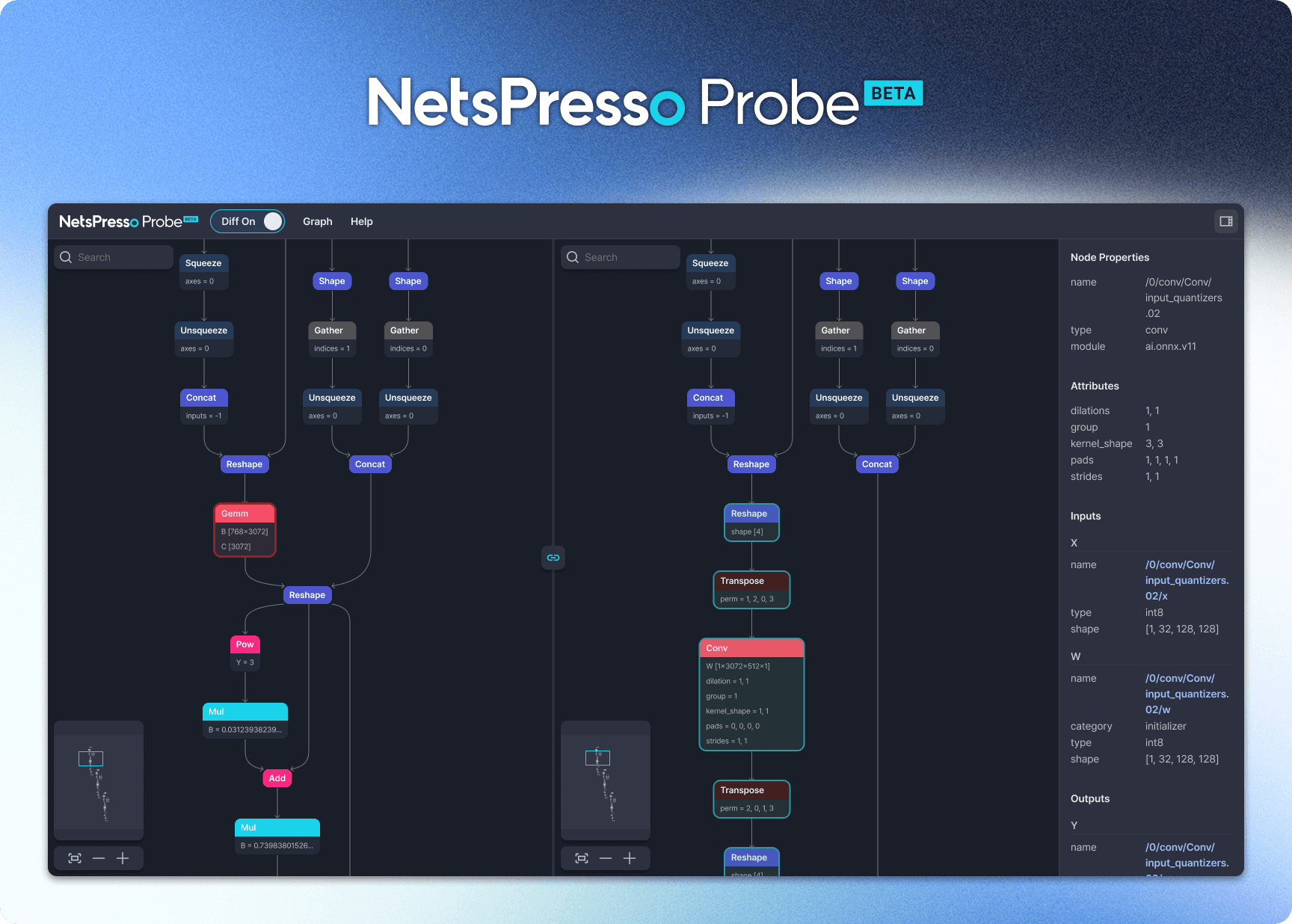
Model Diff

View topology changes between two models side-by-side, including new or removed nodes

Synchronized Graph Navigation

pan and zoom both graph views simultaneously
Custom Node Coloring

highlight the nodes that matter most to your team

Experience our optimization performance firsthand.